

Everyone has heard the same warning on repeat “AI is coming for junior devs.” The rules are changing faster than anyone expected. You can dislike it or ignore it, but AI is already reshaping the job landscape for developers. Yet before we jump to conclusions about being “replaced”, we decided to ask those who actually feel the change in their daily work. Developers who left the junior stage behind years ago and grew into mid and senior engineers. We asked Webix developers a few bold questions about what really happens to their workflow now that AI is fully in the picture.

The State of AI in Web Dev: Real Opinions from Real Developers
To get those answers, we either locked our brave test subjects in a dark basement… or they simply filled out a Google Form. A form packed with questions about which AI tools they use, how exactly they use them, what they do (or don’t) trust about these technologies, and which productivity tricks they’d share with newcomers. Just personal experience from people who spent hours behind a monitor.
Anyway, here are the results of our honest and completely independent research by a real human, for real humans.
Why Developers Turn to AI: Support, Speed, and a Second Opinion
To understand AI’s role in day-to-day work, we started with the most obvious question: “What tasks do you most often use AI for?”
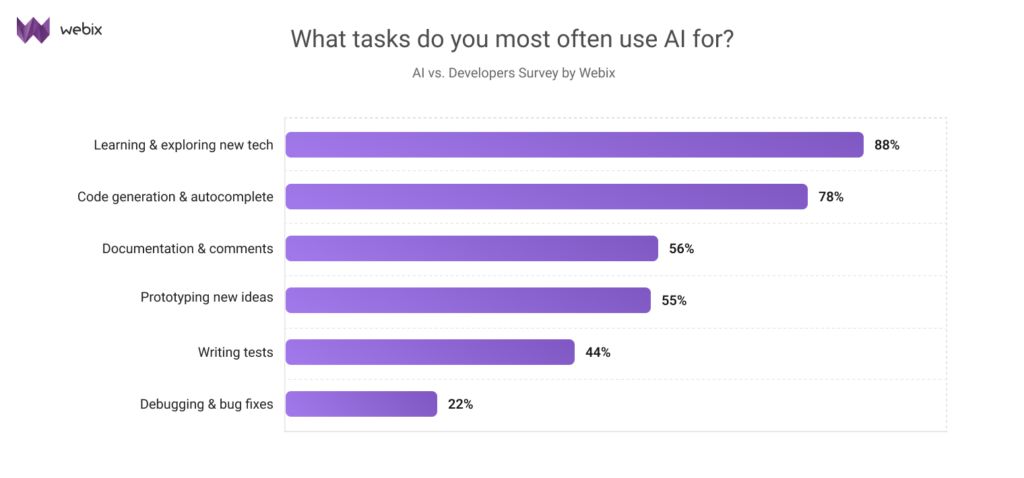
Developers tend to use LLMs as an extra pair of hands, a second opinion or a learning tool, but when it comes to generating new ideas, writing content, or debugging tricky code, they still prefer to rely on themselves. Turns out AI isn’t all that “intelligent” when creative problem-solving is on the line.
Copilot in the IDE vs ChatGPT in the Browser: Where Devs Actually Turn for Help
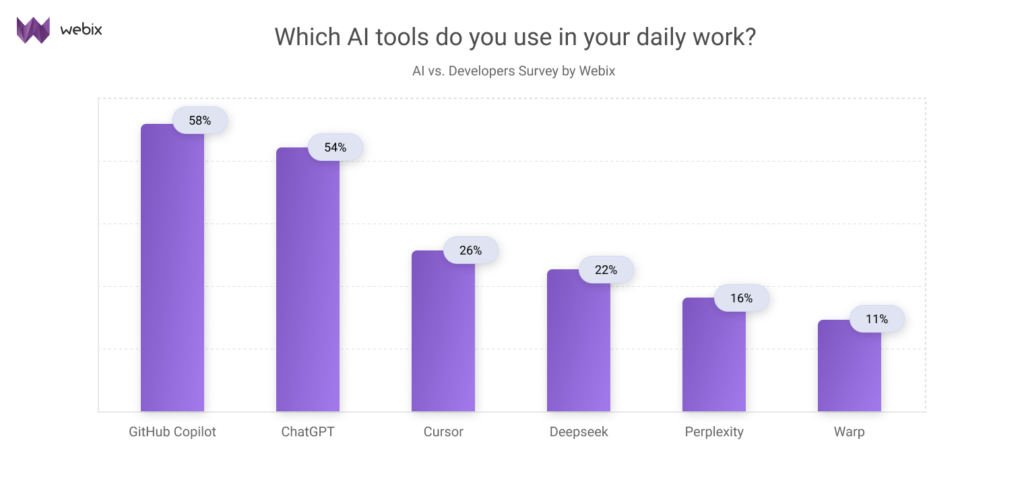
The survey results on the question “Which AI tools do you use in your daily work?” shows that most Webix developers turn to GitHub Copilot and ChatGPT — 58% and 54% respectively. Cursor, Deepseek, and Perplexity are used less often, and the least popular assistant on the list is Warp, an AI-powered terminal with a modern UX.
For context, this is a bit lower than what we see in broader surveys: according to Stack Overflow, ChatGPT (82%) and GitHub Copilot (68%) are the clear market leaders, serving as the main entry point for most developers using out-of-the-box AI assistance.
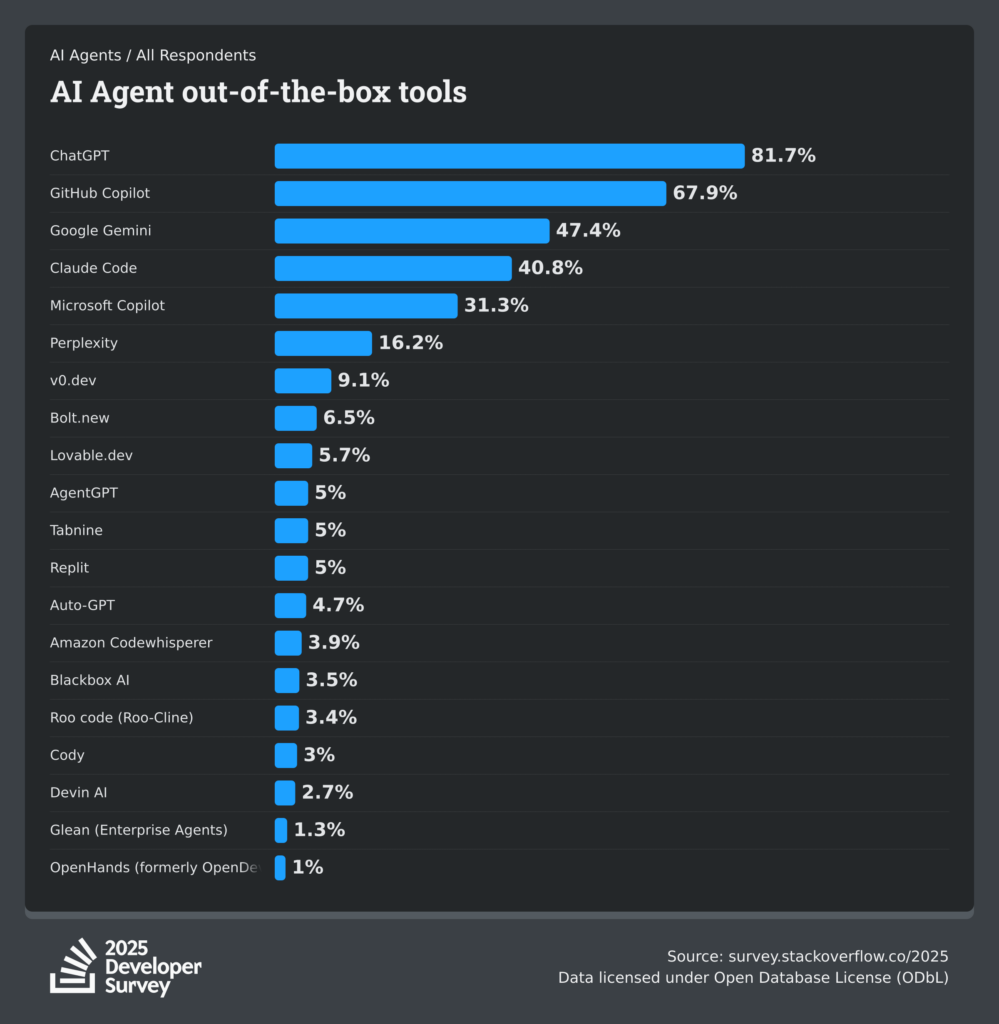
In short, Webix developers follow the same overall trend as the wider developer community, favoring Copilot and ChatGPT. The slightly lower numbers simply reflect their preference for code-focused tools inside the IDE over conversational LLMs. IDE-first feels natural: you’re in the right context, and small decisions or tests happen without leaving your workspace.
Where Developers Don’t Trust AI: High-Context, High-Risk, Human-Only Tasks
AI agents have long become our therapists, content writers, doctors, and designers. But when it comes to AI-assisted coding, there are tasks developers still don’t trust either ChatGPT or Cursor. So we also asked them: “What tasks would you never trust AI with?”
Here are some of other common answers our devs gave:
- “I wouldn’t copy code without reading it. It rarely works perfectly on the first try anyway.”
- “Anything where AI may hallucinate. If the task requires long context or goes beyond basic algorithms, I double-check everything.”
- “Tasks tied to internal company policies.”
- “Writing libraries or handling complex calculations.”
- “Debugging, working with large systems, or anything deeply context-dependent.”
- “Creating a full app from scratch.”
- “Logical code and text reviews that require deep context.”
- “Explaining complex API interfaces.”
- “Tasks that require personal experience or a nuanced understanding of tools.”
What can we see? This open-ended question shed light on the truth. Developers in real projects don’t fully trust AI for anything that needs deep context, critical thinking, or hands-on experience. Our survey also confirms the importance of double-checking everything an AI bot helps you with, otherwise you’ll have to spend much more time finding and fixing errors later.
AI can be helpful for routine tasks and simple algorithms, but when it comes to complex systems, creative problem-solving, or understanding nuanced tools, humans are still in charge.
Would Productivity Survive Without AI? Here’s What Developers Actually Say
There are professions where the rise of AI hasn’t changed much at all. Looking at the answers to the question “Who would write clean, working code faster?”, we can say with confidence that most developers agree that AI noticeably boosts productivity.
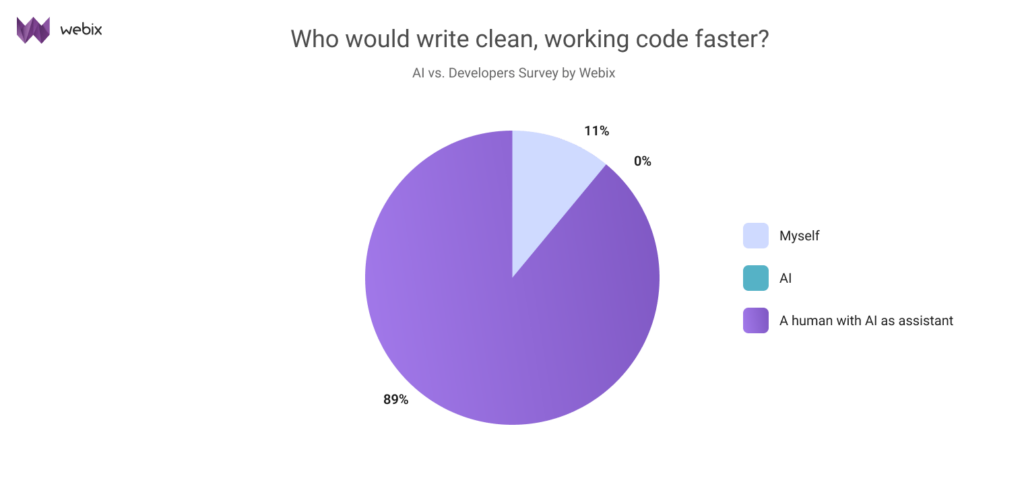
As you can see most developers believe AI works best as a partner, not a replacement. Combining human judgment with AI assistance leads to faster, cleaner, and more reliable code than working alone. As for the 11% of techno-phobes who insist AI will never replace a developer? Somewhere, right now, they’re probably tweaking their CVs “just in case.”
But let’s imagine you could no longer use AI as an assistant, how would your productivity change? On a scale from 1 to 5, where 5 means the productivity would change dramatically and 1 means it wouldn’t change at all. How would your workflow be affected? We addressed this question to our team, here are their anonymous answers:
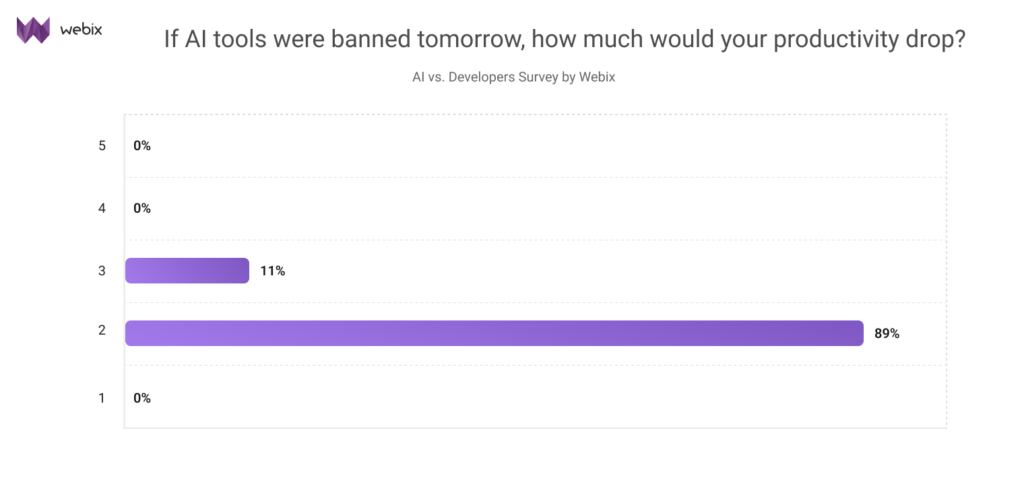
The truth is that AI is no longer optional, it’s already part of the workflow. Almost everyone we surveyed said their productivity wouldn’t drop much if a “strict AI ban” were introduced. But it’s not indispensable. For those who rely on LLMs every day, losing access would hurt a little. No autocomplete, no instant suggestions, but they’d still manage to get things done. Yes, more slowly and with a few extra headaches, but they’ll carry off.
Tips on Coding With AI from Webix developers
You’re probably already using AI in your daily work, and we’d like to share some practical tips from Webix developers on how to make the most of it.
Practical Advice:
- “Do small research before asking AI, it helps you understand the output better.”
- “Provide clear prompts and context.”
- “Always review AI output.”
- “Use AI for prototypes, but design the final logic yourself.”
- “Double-check everything.”
- “Use AI results as examples, not ready solutions.”
- “Treat AI as an autocomplete assistant, not a full developer.”
Overall, it definitely can’t fully replace a human, and I’m not a fan of the overhype. Yes, it’s useful as a tool, but nothing more. As for what happens in the future, I won’t try to predict it, but right now it’s blown out of proportion compared to the actual value it delivers.
Conclusion: AI Helps With the Busywork, Developers Handle the Real Work
Based on our survey of real Webix developers we figured out how AI fits into modern web development. Developers in real projects value and use AI assistants for routine tasks to speed up the process, but they don’t trust LLMs to create solutions with long-context or complex architecture.
What the survey data actually talks about productivity: 9 out of 10 developers say AI gives them a noticeable boost when they deal with repetitive or time-consuming work. Yet it is not essential, 11% state for being more productive even without AI assistants. Experienced developers could still work without it, maybe just a little bit less efficiently and with more effort.
TL:DR; AI keeps reshaping our workflow, but the future of web development still belongs to developers. Those who embrace it wisely will gain speed, confidence, and space for creativity, while staying in the driver’s seat.