


In this article let’s finally answer the following questions: what is the difference between TypeScript and JavaScript? Is plain JavaScript still enough today? And when to use TypeScript vs JavaScript?
When developers compare JavaScript vs TypeScript, they often ask which language is better for beginners or long-term projects. Spoiler: there’s no clear winner here. But there is a better choice depending on what you’re building.
JavaScript vs TypeScript: What’s the Difference?
If you’ve ever wondered whether to start your next web project with JavaScript or TypeScript, this guide breaks down their core differences, real-world use cases, and code examples to help you decide confidently.
What is JavaScript?
JavaScript is one of the most popular languages on the web. JavaScript works in all modern browsers and does not require frameworks or libraries to get started. It is a dynamic language which makes websites interactive and alive.
Recently we published an article about Vanilla JS, where we answered all the questions beginners in web development have ever asked GPT Chat or Google in simple terms.
What is TypeScript?
TypeScript is a superset of JavaScript, which means it does everything JavaScript does, but with extra features designed to make coding safer and more predictable. Under the hood, TypeScript code is transpiled into plain JavaScript, so it runs anywhere JS runs: whether in the browser, Node.js, or elsewhere. This compatibility is one of the TypeScript advantages over JavaScript, allowing developers to enjoy static typing and tooling benefits without losing runtime flexibility.
The most important TypeScript addition is static typing. Developers can either explicitly declare types or rely on TypeScript’s type inference to determine what kind of data their variables and functions should handle. Another distinctive feature of TypeScript is that, unlike JavaScript where errors only become visible at runtime, the TypeScript compiler can catch them before your code even runs.
These two powerful TypeScript features help prevent common bugs, improve readability, and make large-scale applications easier to maintain.
TypeScript vs JavaScript Examples
Writing JavaScript is like driving without navigation. Quick and flexible, but easy to get lost. TypeScript adds a GPS: it may warn you more than you’d like, yet it ensures you reach your destination safely and efficiently.
Let’s break down this difference with a real-world example.Take a look at this snippet:
const thunderbolt = (x, y) => {
return x*y;
}
Do you know what this will return? Honestly, it’s tricky! The thunderbolt function can accept any type: numbers, strings, even objects. So the result really depends on what you pass in.
For example:
thunderbolt("5", 3); // -> 15 – JavaScript converts string "5" into a number
thunderbolt("five", 3); // -> NaN – silent failure due to invalid numeric conversion
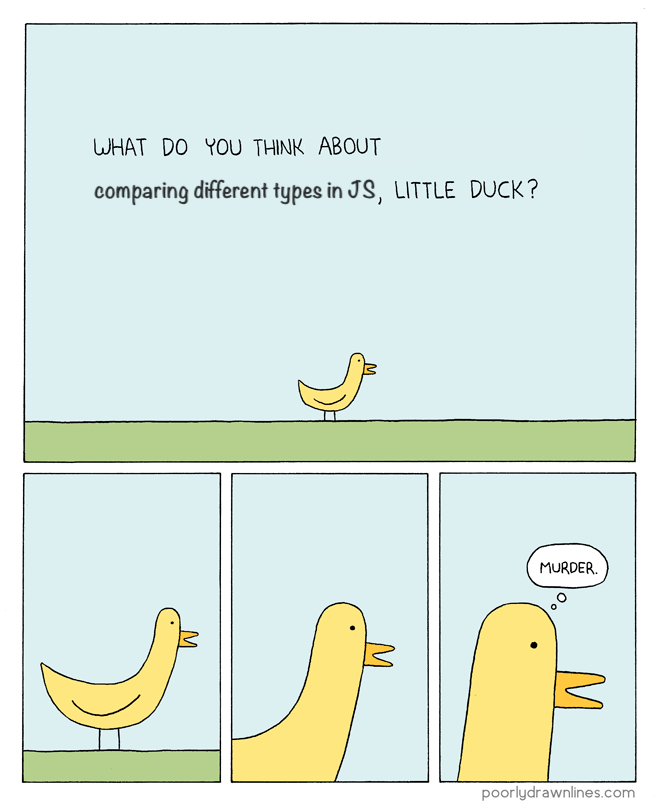
This code example demonstrates how JavaScript loose typing and implicit type conversion can result in subtle errors that are difficult to detect and debug.
Its dynamic typing makes JavaScript super flexible – you can write code quickly without worrying about types. But this freedom comes with responsibility: developers need to carefully track what kind of values functions expect and what they return. The more code you read, the more you realize how easy it is to trip over type-related bugs.
On the flip side, TypeScript solves this problem elegantly – with no surprises when numbers turn into strings or something even more unexpected.
const thunderbolt = (x: number, y: number): number => {
return x*y;
}
This code snippet is the example of explicit typing, where types are declared manually. By the way, TypeScript also supports implicit typing when you can write the code that looks just like JavaScript – without any type annotations. TypeScript will still warn you about possible errors. Anyway, for the strongest type safety, it’s best to combine both implicit and explicit typing.
Now that it’s clear how the code differs, let’s see what the numbers and the community say.
JavaScript vs TypeScript Popularity Check: What Do Trends Say?
Let’s look at Google Trends for the past 5 years. Unsurprisingly, JavaScript is 3–4 times more in demand than TypeScript. But here’s the catch: TypeScript’s line on the chart is steady, no spikes, no collapses.
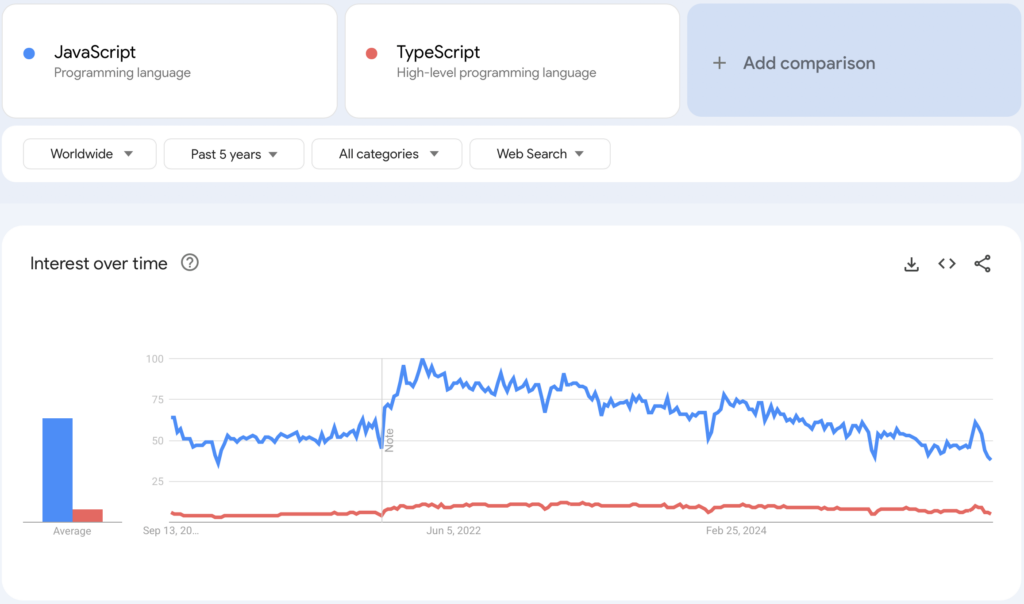
JavaScript vs TypeScript trends
This suggests a simple truth:
- JavaScript is the global lingua franca – nearly every developer has to interact with it at some point.
- TypeScript is a professional tool – more niche, but widely adopted by developers who care about scaling and maintainability
Stack Overflow Developer Survey 2025 backs this up: #1 JavaScript is among the most used languages, while #6 TypeScript consistently ranks as one of the most loved.
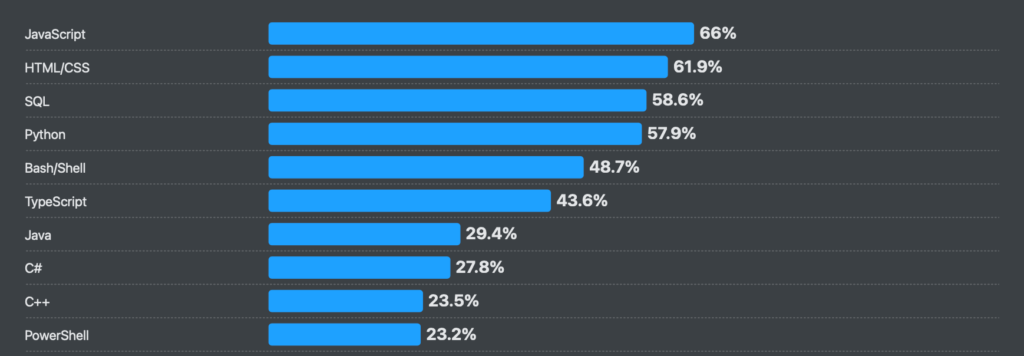
JavaScript vs TypeScript popularity 2025
What Developers Actually Say (Reddit Voices)
We went digging through Reddit threads, and here are the recurring themes:
- “Start with JS, add TS later. Learning TS without JS is like trying to solve three-digit sums without knowing two-digit ones.”
- “TS is a lifesaver in large projects, but overkill for small apps.”
- “Every JS dev ends up writing TS eventually – whether they like it or not.”
In other words, most developers don’t see this as a war. They see it as a matter of timing, when your project and team are ready to benefit from static typing.
Webix JavaScript UI Library already supports TypeScript out of the box: all UI components come with built-in type definitions, so you can enjoy autocompletion, type safety, and clear API hints in your IDE without extra setup.
When JavaScript is Enough
In short JavaScript gives you more freedom, but may bring some chaos to your project. It shines when speed and simplicity matter more than long-term safety.
Prototyping or MVPs
You can build a demo in days, not weeks. Adding TypeScript here might feel like overengineering. .
Small websites or landing pages
No need to set up compilers or configs. You just write and ship.
Solo projects
If you’re the only one touching the code, you might prefer the freedom and flow of JavaScript without type constraints.
When Switch to TypeScript
TypeScript brings order and stability to large projects. It wins in complex, collaborative, and long-lived projects. Here are 4 examples when choosing TS will bring you joy:
Large or distributed teams
Types act like live documentation. Newcomers can instantly see how functions and objects are supposed to be used.
Long-term products (SaaS, enterprise apps)
Static typing prevents subtle bugs that can appear months later. Refactoring is safer and faster.
Critical systems (finance, healthcare, data-heavy apps)
Sometimes mistakes are too expensive. TypeScript’s checks catch many issues before the code is executed.
Framework-driven development
Angular, Next.js, NestJS, and many others are built with TypeScript in mind, so you’ll be more productive with TS from the start.
With TS setup may take longer, but the payoff is fewer bugs and easier scaling in the future. That’s why it makes sense to learn TypeScript after JavaScript, once you’re comfortable with JS, TypeScript naturally builds on top of it.
TypeScript vs JavaScript: Choosing the Right Tool
JavaScript and TypeScript are not competitors so much as different answers to different needs. JavaScript offers unmatched speed and simplicity, while TypeScript adds structure and long-term safety. The right choice depends less on which language is “better” and more on the context of your project. The debate around “JavaScript or TypeScript — which is better” often misses the point: it’s not about superiority, but about choosing the right tool for your specific needs.
| Situation | TypeScript | JavaScript |
| Quick MVP / hackathon | Slower setup, safer growth | Fast launch, may need refactoring |
| Large team | Types = live documentation | Quick start, harder consistency |
| Long-term product | Prevents hidden bugs | Flexible but riskier as code grows |
| Small site / landing | May be overkill | Simple and efficient |
| Third-party libraries | Might need custom types | Easy plug-in, runtime errors possible |
| Critical systems | Catches issues early | Possible, but higher runtime risk |
| Solo projects | Structure helps revisiting | Maximum flexibility, less guidance |
TypeScript vs JavaScript comparison
Conclusion: Which Should You Choose?
The debate “JS vs TS” is a bit pointless. They’re not rivals – they’re family. One gives you raw power and flexibility, the other gives you structure and safety.
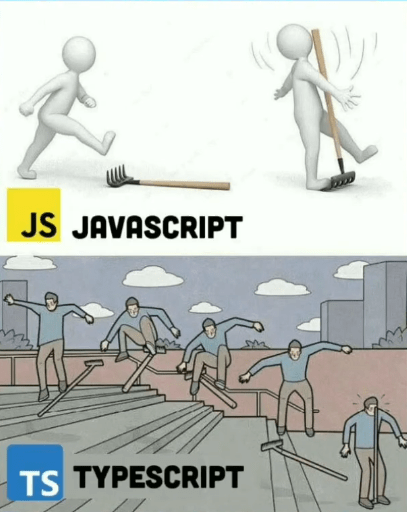
Here’s the pragmatic takeaway:
- If you’re learning or prototyping → stick to JavaScript.
- If you’re building something long-term with a team → embrace TypeScript.
At the end of the day, both languages will keep running on the web.
If you’re currently building a web app with JavaScript and looking for a ready-to-use interface, check out our live demos and pre-built apps. You’ll find everything from full-featured CRM and admin dashboards to smaller JS projects like a budget tracker and chat app. Most of them are available under the MIT license, a perfect way to learn and level up your JavaScript skills with Webix.
F.A.Q.
Q: What is the difference between TypeScript and JavaScript?
TypeScript is JavaScript with extra features that make development safer and more predictable. Its main addition is static typing, which lets you define or infer types so the compiler can catch errors before the code runs.
Q: Is TypeScript faster than JavaScript at runtime?
No, they run at the same speed, because TypeScript doesn’t exist at runtime at all. Everything you write in TS is eventually turned into plain JavaScript, and that’s what the browser or Node.js actually executes. Any performance benefits you’ll feel come more from fewer mistakes and clearer code, not from the language magically running faster.
Q: Do I need to learn JavaScript before learning TypeScript?
Yes, TypeScript builds on top of JavaScript, not instead of it. If you don’t understand how JS works, TS will feel like someone added rules to a game you haven’t learned yet. A solid year of JS basics is usually enough to start feeling comfortable with TypeScript.
Q: Can TypeScript run in the browser without compilation?
Not directly. Browsers only understand JavaScript, so TypeScript needs a quick “translation step” called compilation. Thankfully, tools like Vite or Webpack handle this automatically, so after setup you barely notice the extra step. It just becomes part of your workflow.
Q: Why do large projects often choose TypeScript?
As projects grow, tiny mistakes become expensive, and TypeScript helps catch those mistakes early. It turns a lot of “why did this break again?” moments into “oh, the editor is already warning me about this.” That kind of safety net makes big, long-lived codebases much easier to maintain without losing your sanity.
Q: Does TypeScript eliminate all bugs?
No type system can save you from every possible bug, and TS isn’t pretending to. What it does is catch the obvious, annoying issues (wrong arguments, misspelled properties, unexpected data) before the code even runs. It definitely reduces the number of “how did that get into production?” surprises.
Q: How difficult is it to migrate a JavaScript project to TypeScript?
It really depends on the size of the project and how tidy the original code is. The nice part is that you can migrate gradually: rename one file, add a couple of types, fix a few warnings, and move on. It’s more like cleaning a room drawer by drawer than doing a full renovation in one weekend.
Q: Can I use TypeScript with React/Vue/Node.js?
Absolutely. Modern frameworks and tools either support TypeScript out of the box or have first-class integrations. If you’re already using React or Vue, switching to TypeScript usually feels like turning on the “helpful hints” mode. The editor suddenly knows much more about your components and props.
Q: What are the downsides of using TypeScript?
The biggest downside is the extra layer of setup and learning. Early on it feels like the language is nagging you about things you don’t care about yet. There’s also a bit more overhead for small scripts. But most developers say that after the first couple of weeks, the benefits outweigh the noise.
Q: Is TypeScript worth it for small projects or beginners?
For small weekend projects, plain JavaScript is still perfectly fine. But if you’re learning seriously or planning to work in teams later, TypeScript teaches you good habits early. Think of it as training wheels that actually make you faster instead of slowing you down.
Q: Do TypeScript types affect runtime performance?
Not at all. Types disappear during compilation, they never reach the browser. They don’t add computations, objects, or checks at runtime. All they do is make your editor smarter and your code safer before execution.
Q: What tools do I need to start using TypeScript?
The basics are simple: Node.js, a package manager, and a project initialized with tsconfig.json. Frameworks like Vite, Next.js, and Vue CLI already have TS templates, so you can avoid manual setup entirely. VS Code is the most common editor because it supports TypeScript brilliantly right out of the box.
Q: Is TypeScript going to replace JavaScript?
Probably not, because TypeScript still is JavaScript, just with extra checks. Browsers run JS, and that won’t change anytime soon. What’s more likely is that TypeScript will stay popular for serious development, while JavaScript remains the universal baseline everyone learns first.