Webix 11.4 Released Read More New Features in Core, Kanban & Rich Text Editor, plus a Powerful SpreadSheet Update

WEBIX BLOG

Dynamic Loading. Fetching Unlimited Number of Records from Server Side

Hi everybody. Today we will be speaking about Webix ways to optimize server-client communication in case of huge data. Those of you who are happy to fetch long datasets at once, please raise your hands!

Webix dynamic loading


Just as I’ve expected, nobody’s here.  Everybody has gone to dynamic loading which is implemented very easily with Webix data components.

webix.ui({
  view:"datatable", url:"mydata.php", datafetch:100
});

Initially, a limited number of records (e.g. 100) is loaded, while further requests are triggered by scrolling or paging automatically. Guys, isn’t it nice?

Still, such a pattern requires quite a specific format of a server response –  {data:[ /*array of records*/], pos:0, total_count:100  } – and you may ask yourself: “So what should I do, if I cannot tune the response or I don’t know the total length of server-side data?” Indeed, there are lots of web services that do not provide such information.

The article below shows the solution that relies totally on Webix public API and can be built by any of you.

Release Webix 3.2: SpreadSheet Widget, Rangechart and New Widgets Features

Hey everyone!

Now, while the last days of winter are going by, we are happy to present the first release of the year – Webix 3.2.

Webix 3.2 released


And definitely we would like to start with the most important part of our release – the new widget.

Spreadsheet widget

The truly outstanding hallmark of the February release is a feature-rich Spreadsheet widget that allows editing data in Excel-like manner. Being fully client-side it can load data either from plain JSON or database or even Excel document.

Spreadsheet allows you not only to format text values within cells but also define custom dimensions for cells, merge them into spans, copypaste the cells as well as calculate their values using Excel mathematical functions.  During data editing you can revert all the changes you’ve made and apply them back, if needed.

The Webix way of positioning: how to put everything in its right place

Day by day Webix evolves and dozens of new features appear with every release. But while the framework is constantly improved, something always stays the same.

Let’s talk about the very basic and the most important Webix feature – component positioning and sizing.

1_form_initial

Live demo

Layout. Basics.

The main Webix way of the element positioning is dividing the page into rows and columns.

The basic layout can  be created with the help of the same-name Layout widget. And you can place any of the numerous Webix widgets into any Layout cell:

Navigate your way. Sidebar and Sidemenu

Hey guys, let us check today what Webix offers to make our lives easier during app navigation. I bet that there’s something worth a closer look.

Since the launch of the library its users had a standard Menu at their disposal with the possibility of  placing items horizontally or vertically (too simple). But not very long time ago the developers went further and ended up with two handsome widgets created with user-friendly navigation in mind – Sidemenu and Sidebar.

So, let’s explore the widgets’ functionality to find out the use cases that are more suitable for each of them.

Basically, Sidebar can be initialized on the page with the following code:

webix.ui({
      view: "sidebar",
      data: [
           {id: "dashboard", icon: "dashboard", value: "Dashboards",  data:[
               { id: "dashboard1", value: "Dashboard 1"},
               { id: "dashboard2", value: "Dashboard 2"}
        ]},
         ...
        ]
});

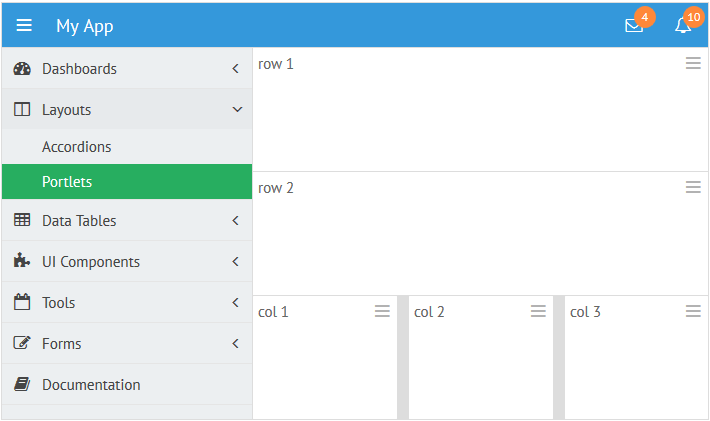
And you get: 

sidebar

Live demo

Release Webix 3.1

Let’s say “Good bye” to the rainy weather and “Good day” to our new release of Webix 3.1! Less than 2 month passed since our last big update of Webix 3.0, and we are already ready to present the new one.

Webix-release-3-1


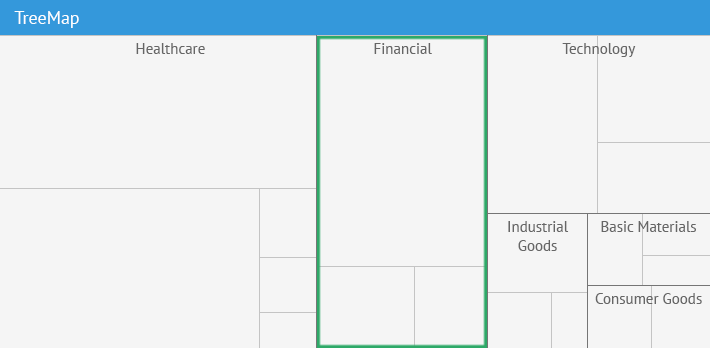
Our library is updated with new widgets – SideMenu and TreeMap. We also created a new component – Sidebar, which is not included in the package, but you can download it right now.

What we have in the programme today:

  1. TreeMap;
  2. Sidebar;
  3. Sidemenu;
  4. AutoWidth for Menus and Buttons.

Complex Content in DataTable

JavaScript Table is the most popular widget of Webix UI framework. It is fast, flexible and can be used in many different scenarios. By default, it shows only a text content in its cells. Nevertheless, you can use cell templating to show a more complex content in the cells of DataTable. Icons, buttons, and even other widgets can be used as cell templates.

Let’s look how it can be done.

Checkbox and Radio buttons

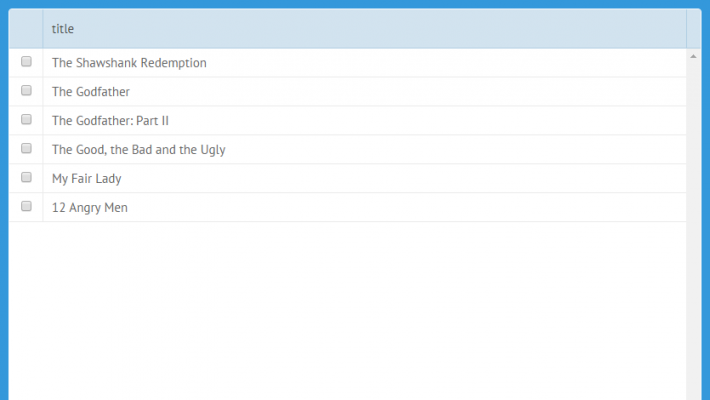
The most common use-case is the adding of a checkbox into a cell of a DataTable. It is so common, that we have added a ready-to-use shortcut. Just write the cell template as follows:

template:"{common.checkbox()}"

and you will get a fully-functional checkbox input.

DataTable

Grow with Webix: Real Showcase from Rael Bauer

Hey everyone!

We continue publishing real showcases from our customers, which were made on Webix. Today we’d like to share an article about the RightNote, personal information manager program for Windows, provided by Rael Bauer.

“RightNote is an advanced personal information manager program for Windows. It allows you to store all bits and pieces of information in a single place and then you can access that information later. For example you can capture webpages, store source code snippets, JavaScript Spreadsheet, project notes etc.. all in a single place. More information can be found here: //www.bauerapps.com/rightnote/

Webix Showcase


We wanted to provide our users with a way to publish their knowledge bases to the web or to mobile devices, so that they could then access or present their information on these platforms.

This meant exporting the RightNote databases to a html/javascript format. We wanted to make sure that the output looked good and was also easy to use and navigate, hopefully providing some functionality similar to the desktop app. We also wanted the javascript to work straight from the file system, i.e. without requiring a server. (Many javascript libraries work fine on a server, but come to halt on filesystems).

Grow with Webix: Real Showcase from Michael Basin

Hey guys!

New week, new showcase from our customers. Today we are presenting a short, but colourful article from Michael Basin. The project, which was made on Webix, is called Blitz-Budget. So let’s start.

“I use JavaScript Pivot for mobile applications for financial accounting as a tool for generating reports. And I do it in an unusual way.

A smartphone is used as a web-server and Pivot is run on a PC as a client. Thus, users get a possibility to make reports on a desktop directly using data from the smartphone.

Blitz-Budget App made on Webix


Blitz-Budget for Android – is the program for accounting and control of personal finance.

Import / Export in Webix 3.0

Web apps are dominating in the modern software development. Born as stateless pieces of HTML, they have evolved to dynamic and smart applications, still bound to the browser and the HTML markup. The next step of evolution is happening just now. A web app is moving beyond the boundaries of the browser. On the one hand, we already have desktop and mobile apps which, in fact, are wrapped web apps, on the other hand, web apps learn how to interact with desktop apps.

In Webix 3.0 we have added a few new API to simplify such a client <-> desktop data interchange.

Data Export from a web app

With Webix 3.0, you have two very powerful data export commands. They are:

webix.toPNG($$("chart"))
webix.toExcel($$("datatable"));

export to png

Those commands allow exporting any Webix component to PNG or Excel. In the case of export to PNG, you can use API with any HTML content. Yes, you can export any HTML content on the page to a PNG image.

// export the whole page to an image
webix.toPNG(document.body);

Grow with Webix: Real Showcase from BNDC company

Bonjour everyone!

Another week, another cool showcase from our customers. Today we are glad to present Bruno Denis from a french company BNDC. The project is called MyMetriks, it’s a business intelligence dashboard platform built by using Webix UI and modern web technologies.

1 17 18 19 20 21 26