Webix Birthday Sale – Up to 25% OFF Celebrate with us and save on Webix licenses. Ends in: 0 Days Get the deal

WEBIX BLOG

Grow with Webix: Real Showcase from Michael Basin

Hey guys!

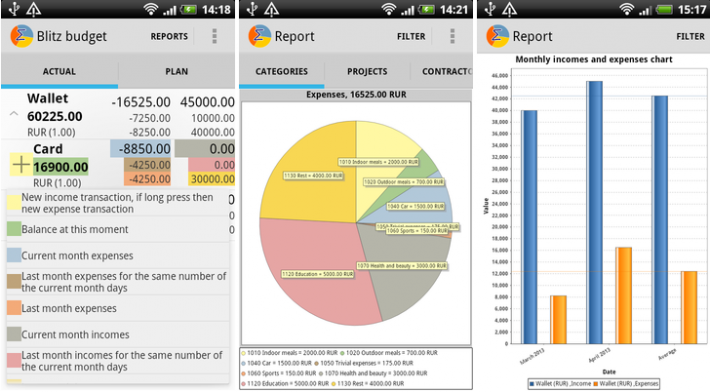
New week, new showcase from our customers. Today we are presenting a short, but colourful article from Michael Basin. The project, which was made on Webix, is called Blitz-Budget. So let’s start.

“I use JavaScript Pivot for mobile applications for financial accounting as a tool for generating reports. And I do it in an unusual way.

A smartphone is used as a web-server and Pivot is run on a PC as a client. Thus, users get a possibility to make reports on a desktop directly using data from the smartphone.

Blitz-Budget App made on Webix


Blitz-Budget for Android – is the program for accounting and control of personal finance.

Import / Export in Webix 3.0

Web apps are dominating in the modern software development. Born as stateless pieces of HTML, they have evolved to dynamic and smart applications, still bound to the browser and the HTML markup. The next step of evolution is happening just now. A web app is moving beyond the boundaries of the browser. On the one hand, we already have desktop and mobile apps which, in fact, are wrapped web apps, on the other hand, web apps learn how to interact with desktop apps.

In Webix 3.0 we have added a few new API to simplify such a client <-> desktop data interchange.

Data Export from a web app

With Webix 3.0, you have two very powerful data export commands. They are:

webix.toPNG($$("chart"))
webix.toExcel($$("datatable"));

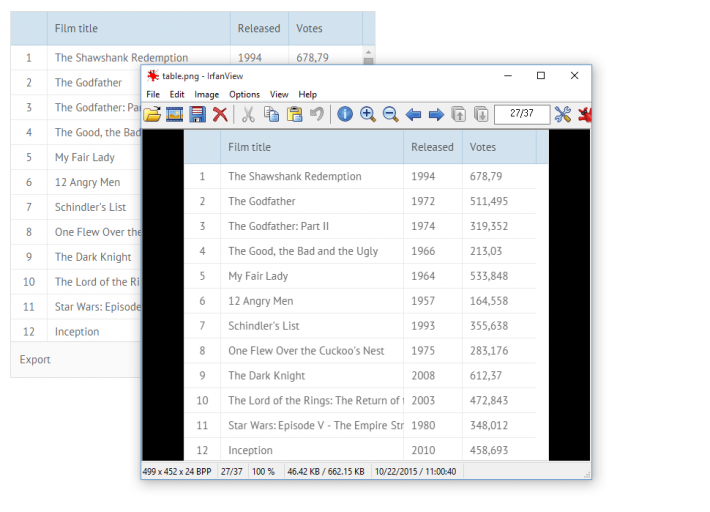
export to png

Those commands allow exporting any Webix component to PNG or Excel. In the case of export to PNG, you can use API with any HTML content. Yes, you can export any HTML content on the page to a PNG image.

// export the whole page to an image
webix.toPNG(document.body);

Grow with Webix: Real Showcase from BNDC company

Bonjour everyone!

Another week, another cool showcase from our customers. Today we are glad to present Bruno Denis from a french company BNDC. The project is called MyMetriks, it’s a business intelligence dashboard platform built by using Webix UI and modern web technologies.

Grow with Webix: Real Showcase from Glasslink Company

Good day everybody!

Today we begin to publish new articles that describe the real use cases which were made with Webix by our customers. And the first article was presented by our customers Lars Kjebekk and Yuriy Klyuch from the Glasslink company.

“My name is Lars Kjebekk and I run the company called Glasslink. We specialize in glass and facade consultancy and also do some custom IT solutions. I have worked a lot with automating processes to improve efficiency and also provide the end users with better service.

Glasslink was contacted by Polyteknikk as they wanted to bring their service to the web. Polyteknikk is a manufacturer of professional tag signs for offshore, building and other fields that require technical marking.

The final result is //myglasslink.no/webix25/polyteknikk2/index.html

The idea was to create a web portal where customers could login and design their signs online.

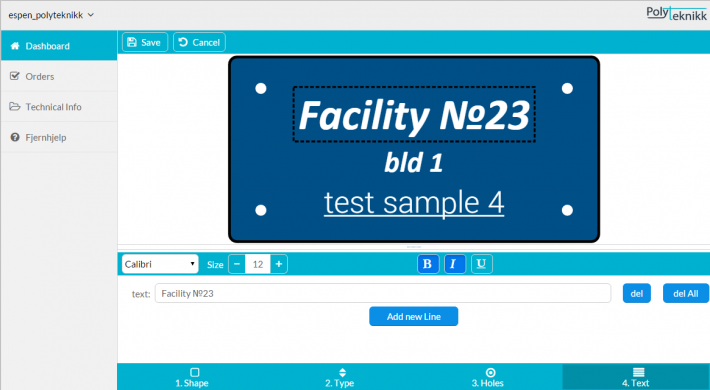
After a lot of sketching and brainstorming, we ended up with a 4 step wizard to design the signs. We have also implemented dynamic image view that shows the changes in colors, fonts, shapes, etc. in real time.

Design Wizard View

WebixShowcase

Working with nested data in Webix UI

We all like to use simple apps where an interface is easy and straight. Creating such apps is a breeze, just put some HTML tags, add a UI framework of your choice, something like Bootstrap, for example, and the app is ready.

In real every-day development, things are bit different. It is common for a business app to work with complex data, that requires some advanced UI to represent it. A nested data is one of such use-cases. There is no a ready to use solution to show such kind of data in raw HTML or in Bootstrap. For such kind of task, you need a more powerful tool. Something like Webix UI.

Webix has also developed an in-house solution for managing large volumes of aggregated data in business web apps: the JavaScript Pivot Table. This tool analyzes and displays data in a tabular format.

Tree

The simplest widget that can be used to show nested data is a Tree. It is common UI element for desktop apps, but still rare in web apps. Webix Tree has all common functionality of tree widget; it allows to represent the hierarchical data as a tree, where branches can be expanded or collapsed. Additionally, Webix Tree is really fast. It renders thousands of items in less than 1 second. And if that is not enough, you can utilize a dynamic loading feature to load data on demand.

webix.ui({
view: "tree", data: nested_data
});


Webix Tree

Webix Jet – a better way to build web apps

Making a web application should be easy.

While developing Webix, we have tried to create components that simplify the development of web applications. Fast, clear, customizable; Such are the components we needed for our projects.

However, it was not enough. Every time we were developing new applications, we invented new solutions about how to keep the code, how to organize navigation, how to work with the server-side code and lots of other boring tasks. After a while, we decided that enough is enough. Eventually, all the best practices for developing on Webix were combined into a micro-framework. So, that’s how Webix Jet was born.

webix jet micro framework


What is Webix Jet

Webix Jet is a micro framework for a single-page application. As you probably know, Webix is a library of diverse and separate UI components. Webix Jet is a framework which allows you to combine and reuse them all and to create and develop your perfect app with minimal code footprint and without stress.

It is very light in weight (less than 10 kb of code ), works with any back end (NodeJs, PHP, .Net ) and can be used for both Desktop and Mobile apps.

Webix 3.0: Webix Jet, Visual Designer, New functionality

Now September is in its most colourful phase and we are happy to present our powerful updates. Today we want to highlight a release of Webix 3.0 that adds two absolutely new ways to build a Webix based app and new features, which are unique, and can’t be found in any other HTML frameworks.

Webix 3.0


Let’s start with 2 major updates.

Webix Jet – framework that works

Webix UI helps you to create apps faster by providing rich widgets. Still the whole app is more complex than just a set of widgets. Developers also need to arrange their code nicely as well as solve such tasks as app routing, state saving, code re-usage and etc. To cover all above concerns, we are introducing micro framework Webix Jet as part of the release. It will definitely save your time and efforts.

How to Build a Mega Menu with Webix

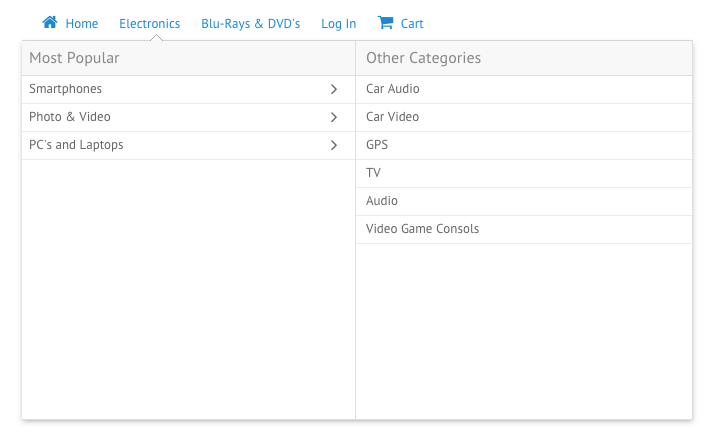
Unlike the regular menus that you can create using the Menu Component, Mega Menus are big and wide enough to allow you place other components and widgets within them. Such a type of menus is widely used on the online shopping websites since it’s pretty easy to use them for navigation purposes.

Here’s an example of how this menu works:

Mega menu built with webix

The demo of the final mega menu with its source code is here.

In this article, we’ll create our own mega menu with Webix in a few easy steps.

Tuning Webix for Odata

As we know, web app development is a complex process that, on the one hand, consists of laborious work at the backend and, on the other hand, includes plenty of efforts while creating a nice-looking and responsive UI.

If you want to optimize the construction of your web applications, you need to find the best option for organizing your work with data as well as a fast and powerful js library for drawing app interface.

This variant can be implemented by using OData, an open data protocol for building RESTful API’s, and by adapting Webix UI library to its rules of requesting and modifying data.

Odata protocol

OData’s goal is to enable a broad access to data regardless of the way it is stored. It allows requesting and updating resources via HTTP commands and provides an entire query language directly in the URL.

Well, if you are reading this post, you probably know a lot about Webix. If suddenly no, you can find more info here.

Meet the Updated Webix Skin Builder

Right after the release of Webix 2.5 we’ve updated our online developer tool Webix Skin Builder. Since this upgrade, it has an built-in Material skin and small UX enhancements.

For those who haven’t used Skin Builder yet, we’ll explain the practical use of this handy designer tool. It allows creating custom skins for the UI of your web apps as well as provides you with the existing set of skins.

Material Skin

When we’ve firstly announced the possibility to apply the Material skin to your web app built with Webix, the skin wasn’t included into the library package. To download it you had to go to the special github.com repository and take the skin there. Now this skin is available right from our Skin Builder tool.

Webix Skin Builder

Webix Skin Builder will also delight you with an improved UI. Just check it to be sure that it works and looks better.

1 18 19 20 21 22 26